1. 概述
1.1 Quick Start
E2B提供agent交互的隔离/安全的Sandbox来执行代码、处理数据等等,启动一个E2B沙箱只用如下的简易代码:
pip install e2bfrom e2b import Sandbox
sandbox = Sandbox.create() # Needs E2B_API_KEY environment variable
result = sandbox.commands.run('echo "Hello from E2B Sandbox!"')
print(result.stdout)其中,E2B核心由两部分构成,分别是 Sandbox 与 Template,其中,关于E2B代码,有如下的几种简单基本操作:
1.1.1 往E2B沙箱中上传文件;
from e2b import Sandbox

sbx = Sandbox.create()

# Read local file relative to the current working directory
with open("local/file", "rb") as file:
   # Upload file to the sandbox to absolute path '/home/user/my-file'
	sbx.files.write("/home/user/my-file", file)
1.1.2 在E2B沙箱中下载package;
分别有如下的两种形式:
-
提前下载package,创建自定义的沙箱;
自定义模版类:
# template.py
from e2b import Template

template = (
    Template()
    .from_template("code-interpreter-v1")
    .pip_install(['cowsay'])  # Install Python packages
    .npm_install(['cowsay'])  # Install Node.js packages
)
创建编译脚本:
# build.prod.py
from dotenv import load_dotenv
from e2b import Template, default_build_logger
from template import template

load_dotenv()

if __name__ == '__main__':
    Template.build(
        template,
        'custom-packages',
        cpu_count=2,
        memory_mb=2048,
        on_build_logs=default_build_logger(),
    )
编译自定义模版类:
python build.prod.py使用自定义的模版类启动沙箱:
from e2b import Sandbox sbx = Sandbox.create("custom-packages") # Your packages are already installed and ready to use -
runtime的在自定义沙箱中下载package;
- 从pip中下载package
from e2b_code_interpreter import Sandbox sbx = Sandbox.create() sbx.commands.run("pip install cowsay") # This will install the cowsay package sbx.run_code(""" import cowsay cowsay.cow("Hello, world!") """)- 利用npm下载Node.js package
from e2b_code_interpreter import Sandbox sbx = Sandbox.create() sbx.commands.run("npm install cowsay") # This will install the cowsay package sbx.run_code(""" import { say } from 'cowsay' console.log(say('Hello, world!')) """, language="javascript")- 根据个人选择下载package
from e2b_code_interpreter import Sandbox

sbx = Sandbox.create()
sbx.commands.run("apt-get update && apt-get install -y curl git")
1.2 沙箱
1.2.1 lifecycle
1.2.1.1 管理沙箱生命周期
from e2b import Sandbox

# Create sandbox with and keep it running for 60 seconds.
# 🚨 Note: The units are seconds.
sandbox = Sandbox.create(
  timeout=60,
)
同时,可以runtime的设置sandbox的timeout时间,注意,设置的timeout时间为从此刻开始累积的timeout时间;
from e2b import Sandbox

# Create sandbox with and keep it running for 60 seconds.
sandbox = Sandbox.create(timeout=60)

# Change the sandbox timeout to 30 seconds.
# 🚨 The new timeout will be 30 seconds from now.
sandbox.set_timeout(30)
1.2.1.2 检索沙箱信息
能够通过函数检索sandbox信息,获取如同sandbox ID,template,metadata,开始时间等等信息;
from e2b import Sandbox

# Create sandbox with and keep it running for 60 seconds.
sandbox = Sandbox.create(timeout=60)

# Retrieve sandbox information.
info = sandbox.get_info()

print(info)

# SandboxInfo(sandbox_id='ig6f1yt6idvxkxl562scj-419ff533',
#   template_id='u7nqkmpn3jjf1tvftlsu',
#   name='base',
#   metadata={},
#   started_at=datetime.datetime(2025, 3, 24, 15, 42, 59, 255612, tzinfo=tzutc()),
#   end_at=datetime.datetime(2025, 3, 24, 15, 47, 59, 255612, tzinfo=tzutc())
# )
1.2.1.3 停止沙箱
能够通过kill命令提前停止沙箱;
from e2b import Sandbox

# Create sandbox with and keep it running for 60 seconds.
sandbox = Sandbox.create(timeout=60)

# Shutdown the sandbox immediately.
sandbox.kill()
1.2.1.4 通过Restful APi管理
import requests
from e2b import Sandbox

sbx = Sandbox.create()

# Get the latest events for a specific sandbox
resp1 = requests.get(
    f"<https://api.e2b.app/events/sandboxes/{sbx.sandbox_id}>",
    headers={
        "X-API-Key": E2B_API_KEY,
    }
)
sandbox_events = resp1.json()
1.2.2 Persistence
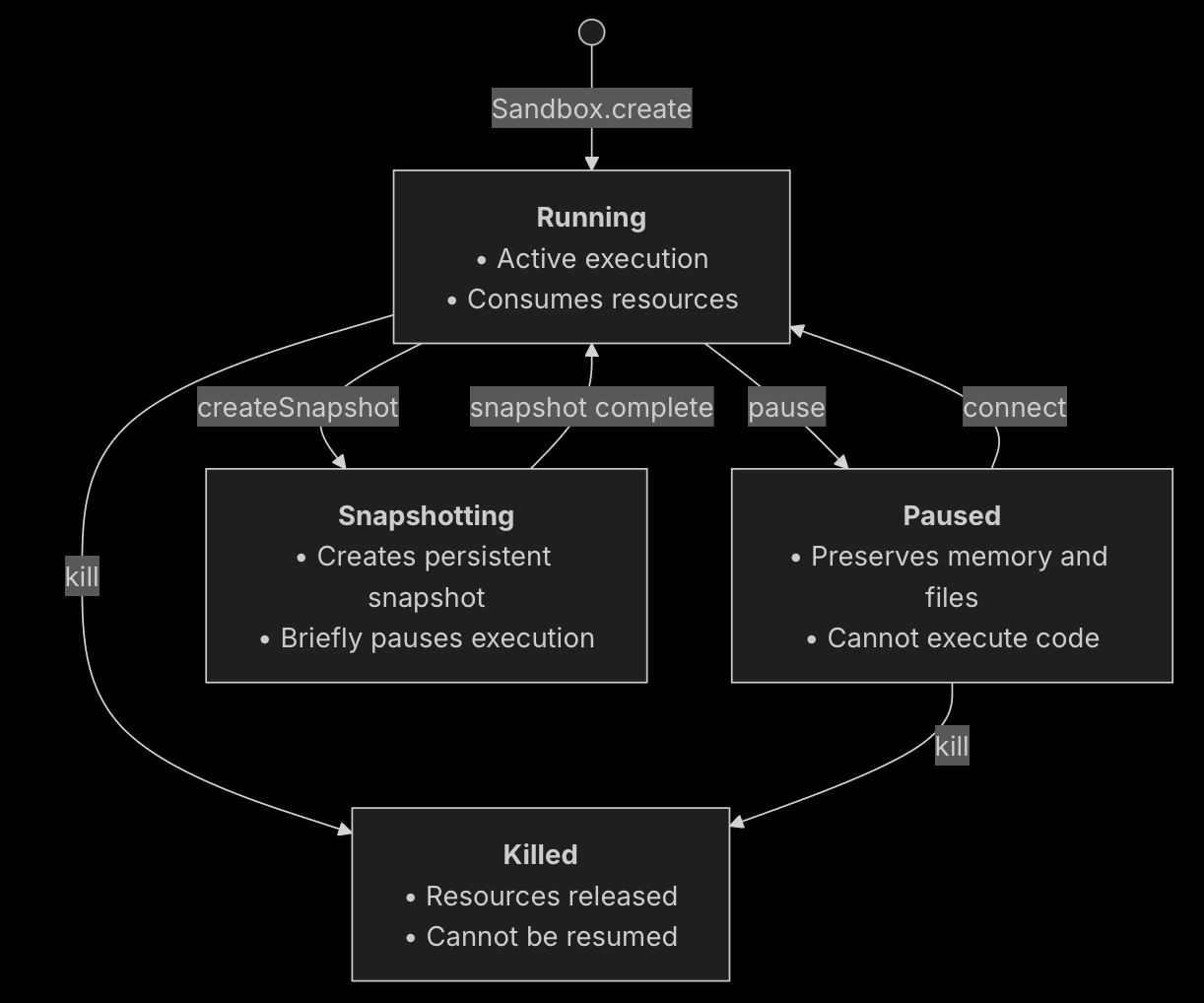
1.2.2.1 沙箱状态切换

1.2.2.2 State descriptions
- Running: The sandbox is actively running and can execute code. This is the initial state after creation.
- Paused: The sandbox execution is suspended but its state is preserved.
- Snapshotting: The sandbox is briefly paused while a persistent snapshot is being created. It automatically returns to Running. See Snapshots.
- Killed: The sandbox is terminated and all resources are released. This is a terminal state.
1.2.2.3 改变沙箱状态
from e2b import Sandbox

sandbox = Sandbox.create()  # Starts in Running state

# Pause the sandbox
sandbox.pause()  # Running → Paused

# Resume the sandbox
sandbox.connect()  # Running/Paused → Running

# Kill the sandbox (from any state)
sandbox.kill()  # Running/Paused → Killed
1.2.2.4 pause/resume沙箱
pause沙箱时,所有的文件系统和内存状态将会被保存,这包括沙箱文件系统和所有运行中进程的所有文件,加载的变量,数据等等;
from e2b import Sandbox

sbx = Sandbox.create()
print('Sandbox created', sbx.sandbox_id)

# Pause the sandbox
# You can save the sandbox ID in your database to resume the sandbox later
sbx.pause()
print('Sandbox paused', sbx.sandbox_id)

# Connect to the sandbox (it will automatically resume the sandbox, if paused)
same_sbx = sbx.connect()
print('Connected to the sandbox', same_sbx.sandbox_id)
1.2.2.5 Network
如果在沙箱外存在一个已连接的服务或server,当pause沙箱时,所有的clients会被disconnected,如果恢复沙箱,虽然service可以重新被访问,然而,你需要重新连接到clients;
1.2.3 Snapshots
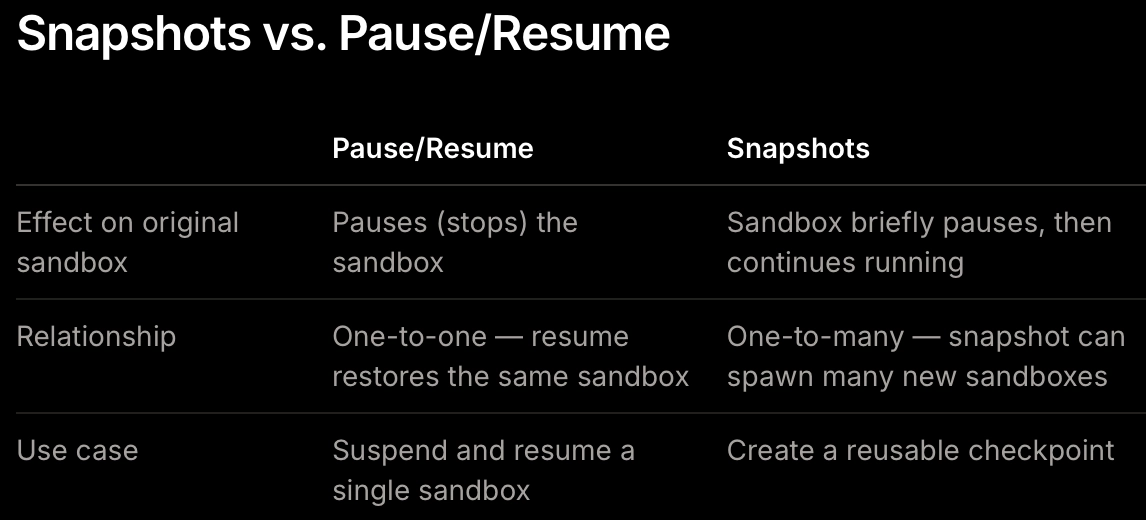
1.2.3.1 Snapshots和Pause/Resume的区别

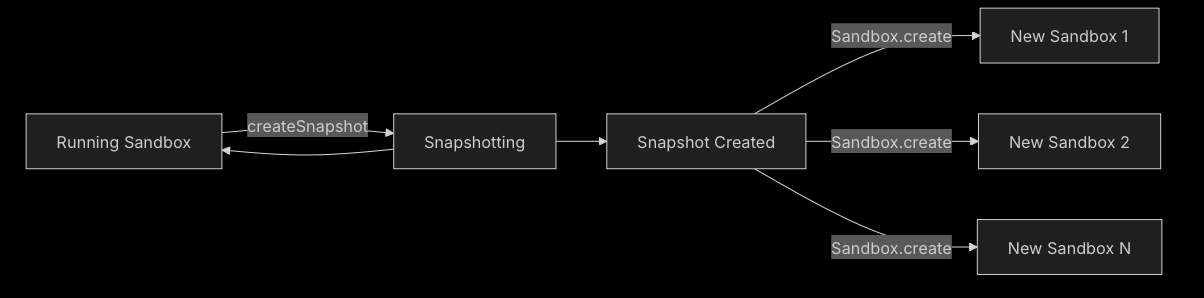
1.2.3.2 Snapshot Flow
1. 概述
1.1 Quick Start
E2B提供agent交互的隔离/安全的Sandbox来执行代码、处理数据等等,启动一个E2B沙箱只用如下的简易代码:
pip install e2bfrom e2b import Sandbox
sandbox = Sandbox.create() # Needs E2B_API_KEY environment variable
result = sandbox.commands.run('echo "Hello from E2B Sandbox!"')
print(result.stdout)其中,E2B核心由两部分构成,分别是 Sandbox 与 Template,其中,关于E2B代码,有如下的几种简单基本操作:
1.1.1 往E2B沙箱中上传文件;
from e2b import Sandbox

sbx = Sandbox.create()

# Read local file relative to the current working directory
with open("local/file", "rb") as file:
   # Upload file to the sandbox to absolute path '/home/user/my-file'
	sbx.files.write("/home/user/my-file", file)
1.1.2 在E2B沙箱中下载package;
分别有如下的两种形式:
-
提前下载package,创建自定义的沙箱;
自定义模版类:
# template.py
from e2b import Template

template = (
    Template()
    .from_template("code-interpreter-v1")
    .pip_install(['cowsay'])  # Install Python packages
    .npm_install(['cowsay'])  # Install Node.js packages
)
创建编译脚本:
# build.prod.py
from dotenv import load_dotenv
from e2b import Template, default_build_logger
from template import template

load_dotenv()

if __name__ == '__main__':
    Template.build(
        template,
        'custom-packages',
        cpu_count=2,
        memory_mb=2048,
        on_build_logs=default_build_logger(),
    )
编译自定义模版类:
python build.prod.py使用自定义的模版类启动沙箱:
from e2b import Sandbox sbx = Sandbox.create("custom-packages") # Your packages are already installed and ready to use -
runtime的在自定义沙箱中下载package;
- 从pip中下载package
from e2b_code_interpreter import Sandbox sbx = Sandbox.create() sbx.commands.run("pip install cowsay") # This will install the cowsay package sbx.run_code(""" import cowsay cowsay.cow("Hello, world!") """)- 利用npm下载Node.js package
from e2b_code_interpreter import Sandbox sbx = Sandbox.create() sbx.commands.run("npm install cowsay") # This will install the cowsay package sbx.run_code(""" import { say } from 'cowsay' console.log(say('Hello, world!')) """, language="javascript")- 根据个人选择下载package
from e2b_code_interpreter import Sandbox

sbx = Sandbox.create()
sbx.commands.run("apt-get update && apt-get install -y curl git")
1.2 沙箱
1.2.1 lifecycle
1.2.1.1 管理沙箱生命周期
from e2b import Sandbox

# Create sandbox with and keep it running for 60 seconds.
# 🚨 Note: The units are seconds.
sandbox = Sandbox.create(
  timeout=60,
)
同时,可以runtime的设置sandbox的timeout时间,注意,设置的timeout时间为从此刻开始累积的timeout时间;
from e2b import Sandbox

# Create sandbox with and keep it running for 60 seconds.
sandbox = Sandbox.create(timeout=60)

# Change the sandbox timeout to 30 seconds.
# 🚨 The new timeout will be 30 seconds from now.
sandbox.set_timeout(30)
1.2.1.2 检索沙箱信息
能够通过函数检索sandbox信息,获取如同sandbox ID,template,metadata,开始时间等等信息;
from e2b import Sandbox

# Create sandbox with and keep it running for 60 seconds.
sandbox = Sandbox.create(timeout=60)

# Retrieve sandbox information.
info = sandbox.get_info()

print(info)

# SandboxInfo(sandbox_id='ig6f1yt6idvxkxl562scj-419ff533',
#   template_id='u7nqkmpn3jjf1tvftlsu',
#   name='base',
#   metadata={},
#   started_at=datetime.datetime(2025, 3, 24, 15, 42, 59, 255612, tzinfo=tzutc()),
#   end_at=datetime.datetime(2025, 3, 24, 15, 47, 59, 255612, tzinfo=tzutc())
# )
1.2.1.3 停止沙箱
能够通过kill命令提前停止沙箱;
from e2b import Sandbox

# Create sandbox with and keep it running for 60 seconds.
sandbox = Sandbox.create(timeout=60)

# Shutdown the sandbox immediately.
sandbox.kill()
1.2.1.4 通过Restful APi管理
import requests
from e2b import Sandbox

sbx = Sandbox.create()

# Get the latest events for a specific sandbox
resp1 = requests.get(
    f"<https://api.e2b.app/events/sandboxes/{sbx.sandbox_id}>",
    headers={
        "X-API-Key": E2B_API_KEY,
    }
)
sandbox_events = resp1.json()
1.2.2 Persistence
1.2.2.1 沙箱状态切换
1.2.2.2 State descriptions
- Running: The sandbox is actively running and can execute code. This is the initial state after creation.
- Paused: The sandbox execution is suspended but its state is preserved.
- Snapshotting: The sandbox is briefly paused while a persistent snapshot is being created. It automatically returns to Running. See Snapshots.
- Killed: The sandbox is terminated and all resources are released. This is a terminal state.
1.2.2.3 改变沙箱状态
from e2b import Sandbox

sandbox = Sandbox.create()  # Starts in Running state

# Pause the sandbox
sandbox.pause()  # Running → Paused

# Resume the sandbox
sandbox.connect()  # Running/Paused → Running

# Kill the sandbox (from any state)
sandbox.kill()  # Running/Paused → Killed
1.2.2.4 pause/resume沙箱
pause沙箱时,所有的文件系统和内存状态将会被保存,这包括沙箱文件系统和所有运行中进程的所有文件,加载的变量,数据等等;
from e2b import Sandbox

sbx = Sandbox.create()
print('Sandbox created', sbx.sandbox_id)

# Pause the sandbox
# You can save the sandbox ID in your database to resume the sandbox later
sbx.pause()
print('Sandbox paused', sbx.sandbox_id)

# Connect to the sandbox (it will automatically resume the sandbox, if paused)
same_sbx = sbx.connect()
print('Connected to the sandbox', same_sbx.sandbox_id)
1.2.2.5 Network
如果在沙箱外存在一个已连接的服务或server,当pause沙箱时,所有的clients会被disconnected,如果恢复沙箱,虽然service可以重新被访问,然而,你需要重新连接到clients;
1.2.3 Snapshots
1.2.3.1 Snapshots和Pause/Resume的区别
1.2.3.2 Snapshot Flow