cuda graph的节点
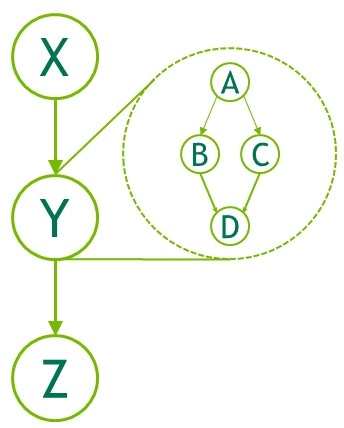
cuda graph本质是有向图,前面的节点计算完成后,后续的节点才可以开始,具体而言,可能的节点为
- GPU kernel node,表示一个cuda kernel
- Memcpy node,可以进行device与host之间的内存拷贝
- Memset node,对device memory进行初始化
- Host (executable) node, 可以执行一个CPU上的函数
- subgraph node, 一个cudagraph子图。
- Empty (no-op) node, 一个空节点。
- External event wait node,表示等待某个event的节点
- External event record node,表示记录某个event的节点
- Memory allocation node,表示一个内存分配的节点
- Memory free node,表示一个内存释放的节点
- External semaphore signal node、External semaphore wait node、Conditional node等节点类型太复杂,这里就不列出来了。
以上这些节点中,大部分节点都对应于一个cuda函数。Host (executable) node虽然从名字上看记录的是CPU上的函数,无法直接被cuda识别,但其实并不能记录任意的CPU函数,而是记录通过cudaLaunchHostFunc启动的CPU函数。
使用stream capture捕获cuda graph
#include <iostream>
#include <cuda_runtime.h>

#define cudaCheck(ans) { gpuAssert((ans), __FILE__, __LINE__); }
inline void gpuAssert(cudaError_t code, const char *file, int line, bool abort=true) {
    if (code != cudaSuccess) {
        fprintf(stderr, "GPUassert: %s %s %d\\n", cudaGetErrorString(code), file, line);
        if (abort) exit(code);
    }
}

// Kernel functions to perform computation
__global__ void kernel1(int64_t *data, int64_t repeat) {
    int idx = threadIdx.x + blockIdx.x * blockDim.x;
    for (size_t i = 0; i < repeat; i++) {
        data[idx] += 1;
    }
}

__global__ void kernel2(int64_t *data, int64_t repeat) {
    int idx = threadIdx.x + blockIdx.x * blockDim.x;
    for (size_t i = 0; i < repeat; i++) {
        data[idx] += 2;
    }
}

__global__ void kernel3(int64_t *data, int64_t repeat) {
    int idx = threadIdx.x + blockIdx.x * blockDim.x;
    for (size_t i = 0; i < repeat; i++) {
        data[idx] -= 1;
    }
}

int main() {
    const int dataSize = 1024;
    const int printSize = 10;
    int64_t *h_data = new int64_t[dataSize]; // Host data
    int64_t *d_data1, *d_data2; // Device data

    // Initialize host data
    for (int i = 0; i < dataSize; i++) {
        h_data[i] = 0;
    }

    // Allocate memory on the device
    cudaCheck(cudaMalloc((void**)&d_data1, dataSize * sizeof(int64_t)));
    cudaCheck(cudaMalloc((void**)&d_data2, dataSize * sizeof(int64_t)));

    // Transfer data from host to device
    cudaCheck(cudaMemcpy(d_data1, h_data, dataSize * sizeof(int64_t), cudaMemcpyHostToDevice));
    cudaCheck(cudaMemcpy(d_data2, h_data, dataSize * sizeof(int64_t), cudaMemcpyHostToDevice));

    // Define grid and block dimensions
    dim3 blockDim(256);
    dim3 gridDim((dataSize + blockDim.x - 1) / blockDim.x);

    // Create streams and event
    cudaStream_t stream1, stream2;
    cudaEvent_t event1, event2;
    cudaCheck(cudaEventCreate(&event1));
    cudaCheck(cudaEventCreate(&event2));
    int priorityHigh, priorityLow;
    cudaCheck(cudaDeviceGetStreamPriorityRange(&priorityLow, &priorityHigh));
    cudaCheck(cudaStreamCreate(&stream1));
    cudaCheck(cudaStreamCreateWithPriority(&stream2, cudaStreamDefault, priorityHigh));

    // Start stream capture on stream1
    cudaCheck(cudaStreamBeginCapture(stream1, cudaStreamCaptureModeGlobal));

    const int64_t repeat = 1000;

    // Execute kernels with stream capture
    kernel1<<<gridDim, blockDim, 0, stream1>>>(d_data1, repeat);
    cudaCheck(cudaEventRecord(event1, stream1)); // Record event1 after kernel1 execution

    // Use events to synchronize
    cudaCheck(cudaStreamWaitEvent(stream2, event1, 0));
    kernel2<<<gridDim, blockDim, 0, stream2>>>(d_data1, repeat);
    cudaCheck(cudaEventRecord(event2, stream2)); // Record event after kernel2
    kernel3<<<gridDim, blockDim, 0, stream1>>>(d_data2, repeat);
    cudaCheck(cudaStreamWaitEvent(stream1, event2, 0)); // Wait on event2 in stream1
    // End stream capture
    cudaGraph_t graph;
    cudaCheck(cudaStreamEndCapture(stream1, &graph));

    // Instantiate and launch the graph
    cudaGraphExec_t instance;
    cudaCheck(cudaGraphInstantiate(&instance, graph, NULL, NULL, 0));
    cudaCheck(cudaGraphLaunch(instance, stream1));

    // Synchronize stream to complete graph execution
    cudaCheck(cudaStreamSynchronize(stream1));

    // Print graph in DOT format
    cudaCheck(cudaGraphDebugDotPrint(graph, "graph.dot", cudaGraphDebugDotFlagsVerbose));

    // Transfer data back from device to host
    cudaCheck(cudaMemcpy(h_data, d_data1, dataSize * sizeof(int64_t), cudaMemcpyDeviceToHost));

    // Display results
    std::cout << "Data after kernel1 and kernel2:" << std::endl;
    for (int i = 0; i < printSize; i++) {
        std::cout << h_data[i] << " ";
    }
    std::cout << std::endl;

    cudaCheck(cudaMemcpy(h_data, d_data2, dataSize * sizeof(int64_t), cudaMemcpyDeviceToHost));
    std::cout << "Data after kernel3:" << std::endl;
    for (int i = 0; i < printSize; i++) {
        std::cout << h_data[i] << " ";
    }
    std::cout << std::endl;

    // Cleanup
    cudaCheck(cudaFree(d_data1));
    cudaCheck(cudaFree(d_data2));
    delete[] h_data;
    cudaCheck(cudaGraphDestroy(graph));
    cudaCheck(cudaGraphExecDestroy(instance));
    cudaCheck(cudaStreamDestroy(stream1));
    cudaCheck(cudaStreamDestroy(stream2));
    cudaCheck(cudaEventDestroy(event1));
    cudaCheck(cudaEventDestroy(event2));
    return 0;
}
上面简单展示了一个捕获cuda graph的代码;
graph capture期间禁止执行函数
当一个stream处在graph capture状态时,实际上CPU下发的kernel都没有执行,只是被记录下来了。因此,与GPU kernel执行状态相关的函数都不能使用,例如:
- 对stream进行同步(cudaStreamSynchronize)
- 隐含stream同步的操作(对context进行同步、对device进行同步,都会强制内部包含的全部stream进行同步,如果其中有stream处在graph capture状态,就会报错)
- 隐含stream同步的操作,如当前graph capture的stream是blocking stream,则涉及null stream的操作都不可用,例如cudaMalloc
- 对stream上面record的event进行的状态查询、同步操作
其中,特别注意到,除非当前stream是nonblocking stream,否则cudaMalloc与cudaFree在graph capture期间都不可用(用的话就会报错operation not permitted when stream is capturing)。下面是几个替换列表:
cudaMemcpy→cudaMemcpyAsynccudaMemset→cudaMemsetAsynccudaMalloc→cudaMallocAsynccudaFree→cudaFreeAsync
其中cudaMallocAsync与cudaFreeAsync涉及到显存的申请与释放,在进一步分析它们在cudagraph中的行为之前,我们需要先整理它们与cuda memory pool之间的关系。
cudaMallocAsync与cuda memory pool
我们首先以一个简单的a+b kernel为例,观察cudaMallocAsync/cudaFreeAsync对可用显存的影响:
#include <cuda_runtime.h>
#include <iostream>

// Error checking macro and function
#define cudaCheck(ans) { gpuAssert((ans), __FILE__, __LINE__); }
inline void gpuAssert(cudaError_t code, const char *file, int line, bool abort=true) {
    if (code != cudaSuccess) {
        fprintf(stderr, "GPUassert: %s %s %d\\n", cudaGetErrorString(code), file, line);
        if (abort) exit(code);
    }
}

__global__ void addKernel(int *a, int *b, int *c, int N) {
    int idx = threadIdx.x + blockIdx.x * blockDim.x;
    if (idx < N) {
        c[idx] = a[idx] + b[idx];
    }
}

void logMemoryStatus(const char* message) {
    size_t free_mem, total_mem;
    cudaCheck(cudaMemGetInfo(&free_mem, &total_mem));
    float free_gb = free_mem / (float)(1 << 30);  // Convert bytes to gigabytes
    float total_gb = total_mem / (float)(1 << 30);
    std::cout << message << " - Free Memory: " << free_gb << " GB, Total Memory: " << total_gb << " GB\\n";
}

int main() {
    cudaMemPool_t mempool;
    cudaDeviceGetDefaultMemPool(&mempool, 0);
    uint64_t threshold = 0; // UINT64_MAX;
    cudaMemPoolSetAttribute(mempool, cudaMemPoolAttrReleaseThreshold, &threshold);

    const int N = 1024 * 1024 * 256;
    const int bytes = N * sizeof(int);
    int *a, *b, *c, *h_c;

    // Allocate device memory for a and b
    cudaCheck(cudaMalloc(&a, bytes));
    cudaCheck(cudaMalloc(&b, bytes));

    // Initialize a and b on the host
    int *h_a = new int[N];
    int *h_b = new int[N];
    for (int i = 0; i < N; ++i) {
        h_a[i] = i;
        h_b[i] = i;
    }

    // Copy data from host to device
    cudaCheck(cudaMemcpy(a, h_a, bytes, cudaMemcpyHostToDevice));
    cudaCheck(cudaMemcpy(b, h_b, bytes, cudaMemcpyHostToDevice));

    // Allocate host memory for the result
    h_c = new int[N];

    // Create a stream
    cudaStream_t stream;
    cudaCheck(cudaStreamCreate(&stream));

    logMemoryStatus("before cudaMallocAsync");

    // Allocate memory for c during graph capture using cudaMallocAsync
    cudaCheck(cudaMallocAsync(&c, bytes, stream));

    logMemoryStatus("after cudaMallocAsync");

    // Launch the add kernel
    dim3 block(256);
    dim3 grid((N + block.x - 1) / block.x);
    addKernel<<<grid, block, 0, stream>>>(a, b, c, N);

    // Copy the output to CPU using cudaMemcpyAsync
    cudaCheck(cudaMemcpyAsync(h_c, c, bytes, cudaMemcpyDeviceToHost, stream));

    // Free c using cudaFreeAsync within graph capture
    cudaCheck(cudaFreeAsync(c, stream));

    logMemoryStatus("after cudaFreeAsync");

    // Wait for stream to complete
    cudaCheck(cudaStreamSynchronize(stream));

    logMemoryStatus("after stream sync");

    // Check result
    bool correct = true;
    for (int i = 0; i < N; ++i) {
        if (h_c[i] != h_a[i] + h_b[i]) {
            correct = false;
            break;
        }
    }
    if (correct) {
        std::cout << "Results are correct!" << std::endl;
    } else {
        std::cout << "Results are incorrect!" << std::endl;
    }

    // Cleanup

    cudaCheck(cudaFree(a));
    cudaCheck(cudaFree(b));
    delete[] h_a;
    delete[] h_b;
    delete[] h_c;

    cudaCheck(cudaStreamDestroy(stream));

    return 0;
}
输出结果为:
before cudaMallocAsync - Free Memory: 29.4301 GB, Total Memory: 31.7325 GB
after cudaMallocAsync - Free Memory: 28.4301 GB, Total Memory: 31.7325 GB
after cudaFreeAsync - Free Memory: 28.4301 GB, Total Memory: 31.7325 GB
after stream sync - Free Memory: 29.4301 GB, Total Memory: 31.7325 GB
Results are correct!从中可以看到,执行cudaMallocAsync之后,显存马上减少;但是执行cudaFreeAsync之后,显存并没有立马恢复,而是等到stream同步之后才恢复。
为了理解这一现象,我们需要引入memory pool的概念。当我们使用朴素的cudaMalloc时,每次都是向驱动真的申请了一块显存,需要消耗很长的时间。而当我们使用cudaMallocAsync时,cuda会维护一个memory pool,只有当pool里面的显存不够了才真的向驱动申请显存。当我们对一个stream进行同步时,stream就会通知memory pool释放不再需要的显存。大致流程可以总结为:

也就是说,cudaFreeAsync只会先归还显存到Memory Pool中,并不会立刻归还到physical memory中;
其中,最令人头疼的显存不足问题(cuda out of memory,简称OOM),就发生在memory pool向cuda driver直接申请显存的这一步。
一般情况下(非graph capture期间),cudaMallocAsync/cudaFreeAsync使用的cuda default memory pool,是stream参数所在的device的memory pool(可以用cudaDeviceGetMempool/cudaDeviceSetMempool获取、改变当前的默认memory pool),每个device默认会创建一个memory pool,它也叫default memory pool或者implicit memory pool。
一个memory pool常有的功能,cuda memory pool都有:
- 我们可以用
cudaMemPoolCreate函数直接创建自己的memory pool。 - 我们可以用
cudaMemPoolGetAttribute函数查询该memory pool从driver申请了多少显存、分配了多少显存;以及历史上申请显存的最大值、使用显存的最大值(文档里称为high watermark,即最高水位线) - 我们可以用
cudaMemPoolAttrReleaseThreshold设置未分配显存达到多大时归还一部分给driver - 我们可以用
cudaMemPoolTrimTo手动释放memory pool的(未分配)显存
graph caputure期间的显存管理
当我们计算一个巨大的神经网络时,除了权重是固定的、输入是给定的,很多中间隐藏层的输出都是临时创建、计算、销毁的。前面我们已经知道在graph capture期间不能用cudaMalloc,所以我们只能用带stream参数的cudaMallocAsync函数来创建中间变量。这里就涉及到graph capture期间的显存管理了,这是一个非常复杂的内容,文档里专门花了一整章来介绍这部分内容。
当我们理解了cuda memory pool之后,这一点就不难理解了。cuda runtime为每个device保留了一个专门用于graph的memory pool。用户无法创建、删除这个graph memory pool,无法拿到handle,只能通过专门的cudaDeviceGetGraphMemAttribute/cudaDeviceSetGraphMemAttribute/cudaDeviceGraphMemTrim函数来操作这个特殊的memory pool。
将上述代码改成使用cudagraph:
#include <cuda_runtime.h>
#include <iostream>

// Error checking macro and function
#define cudaCheck(ans) { gpuAssert((ans), __FILE__, __LINE__); }
inline void gpuAssert(cudaError_t code, const char *file, int line, bool abort=true) {
    if (code != cudaSuccess) {
        fprintf(stderr, "GPUassert: %s %s %d\\n", cudaGetErrorString(code), file, line);
        if (abort) exit(code);
    }
}

__global__ void addKernel(int *a, int *b, int *c, int N) {
    int idx = threadIdx.x + blockIdx.x * blockDim.x;
    if (idx < N) {
        c[idx] = a[idx] + b[idx];
    }
}

void logMemoryStatus(const char* message) {
    // Memory information variables
    size_t free_mem, total_mem;
    cudaCheck(cudaMemGetInfo(&free_mem, &total_mem));
    float free_gb = free_mem / (float)(1 << 30);  // Convert bytes to gigabytes
    float total_gb = total_mem / (float)(1 << 30);

    // Variables for graph memory attributes
    size_t usedMemCurrent, usedMemHigh, reservedMemCurrent, reservedMemHigh;

    // Retrieve graph memory usage information
    cudaCheck(cudaDeviceGetGraphMemAttribute(0, cudaGraphMemAttrUsedMemCurrent, &usedMemCurrent));
    cudaCheck(cudaDeviceGetGraphMemAttribute(0, cudaGraphMemAttrUsedMemHigh, &usedMemHigh));
    cudaCheck(cudaDeviceGetGraphMemAttribute(0, cudaGraphMemAttrReservedMemCurrent, &reservedMemCurrent));
    cudaCheck(cudaDeviceGetGraphMemAttribute(0, cudaGraphMemAttrReservedMemHigh, &reservedMemHigh));

    // Print basic memory info
    std::cout << message << " - Free Memory: " << free_gb << " GB, Total Memory: " << total_gb << " GB, Graph Memory Usage: " << usedMemCurrent / (double)(1 << 30) << " GB, Graph Reserved Memory: " << reservedMemCurrent / (double)(1 << 30) << " GB\\n";
}

int main() {
    cudaMemPool_t mempool;
    cudaDeviceGetDefaultMemPool(&mempool, 0);
    uint64_t threshold = 0; // UINT64_MAX;
    cudaMemPoolSetAttribute(mempool, cudaMemPoolAttrReleaseThreshold, &threshold);

    const int N = 1024 * 1024 * 256;
    const int bytes = N * sizeof(int);
    int *a, *b, *c, *h_c;

    // Allocate device memory for a and b
    cudaCheck(cudaMalloc(&a, bytes));
    cudaCheck(cudaMalloc(&b, bytes));

    // Initialize a and b on the host
    int *h_a = new int[N];
    int *h_b = new int[N];
    for (int i = 0; i < N; ++i) {
        h_a[i] = i;
        h_b[i] = i;
    }

    // Copy data from host to device
    cudaCheck(cudaMemcpy(a, h_a, bytes, cudaMemcpyHostToDevice));
    cudaCheck(cudaMemcpy(b, h_b, bytes, cudaMemcpyHostToDevice));

    // Allocate host memory for the result
    h_c = new int[N];

    // Create a stream
    cudaStream_t stream;
    cudaCheck(cudaStreamCreate(&stream));

    logMemoryStatus("before capture");

    // Begin graph capture
    cudaGraph_t graph;
    cudaCheck(cudaStreamBeginCapture(stream, cudaStreamCaptureModeGlobal));

    // Allocate memory for c during graph capture using cudaMallocAsync
    cudaCheck(cudaMallocAsync(&c, bytes, stream));

    logMemoryStatus("inside capture, after cudaMallocAsync");

    // Launch the add kernel
    dim3 block(256);
    dim3 grid((N + block.x - 1) / block.x);
    addKernel<<<grid, block, 0, stream>>>(a, b, c, N);

    // Copy the output to CPU using cudaMemcpyAsync
    cudaCheck(cudaMemcpyAsync(h_c, c, bytes, cudaMemcpyDeviceToHost, stream));

    // End graph capture
    cudaCheck(cudaStreamEndCapture(stream, &graph));

    // Launch the graph
    cudaGraphExec_t graphExec;
    cudaCheck(cudaGraphInstantiateWithFlags(&graphExec, graph, cudaGraphInstantiateFlagAutoFreeOnLaunch));

    logMemoryStatus("before execution");

    cudaCheck(cudaGraphLaunch(graphExec, stream));
    cudaCheck(cudaStreamSynchronize(stream));
    logMemoryStatus("after the first execution");

    cudaCheck(cudaGraphLaunch(graphExec, stream));
    cudaCheck(cudaStreamSynchronize(stream));
    logMemoryStatus("after the second execution");

    // Free c using cudaFreeAsync within graph capture
    cudaCheck(cudaFreeAsync(c, stream));
    cudaCheck(cudaStreamSynchronize(stream));
    logMemoryStatus("after cudaFreeAsync");

    cudaCheck(cudaDeviceGraphMemTrim(0));
    logMemoryStatus("after cudaDeviceGraphMemTrim");

    // Output the graph to a .dot file
    cudaCheck(cudaGraphDebugDotPrint(graph, "graph.dot", cudaGraphDebugDotFlagsVerbose));

    // Check result
    bool correct = true;
    for (int i = 0; i < N; ++i) {
        if (h_c[i] != h_a[i] + h_b[i]) {
            correct = false;
            break;
        }
    }
    if (correct) {
        std::cout << "Results are correct!" << std::endl;
    } else {
        std::cout << "Results are incorrect!" << std::endl;
    }

    // Cleanup

    cudaCheck(cudaGraphDestroy(graph));
    cudaCheck(cudaGraphExecDestroy(graphExec));

    cudaCheck(cudaFree(a));
    cudaCheck(cudaFree(b));
    delete[] h_a;
    delete[] h_b;
    delete[] h_c;

    cudaCheck(cudaStreamDestroy(stream));

    return 0;
}在graph执行之前,我们已经分配好了a和b的显存。graph执行期间:
- 动态分配显存给
c - 调用add kernel, 计算
c的结果 - 将c复制到CPU内存
注意,我特意将“释放c的显存”这一步(cudaCheck(cudaFreeAsync(c, stream));)放在了cudagraph外面。也就是说,每次执行这个cudagraph之后,就有一段没有释放的显存。此时如果没有执行cudaFreeAsync就在此执行graph,就会报错。所以,尤其要注意,这段代码构造graph的时候使用了cudaGraphInstantiateFlagAutoFreeOnLaunch参数,它的作用就在于:下次launch graph的时候,如果cuda runtime发现有一些cudaMallocAsync的显存没有释放,则会在运行graph之前自动释放。这就是 “ AutoFreeOnLaunch”的含义。
执行以上代码,输出结果为:
before capture - Free Memory: 29.4301 GB, Total Memory: 31.7325 GB, Graph Memory Usage: 0 GB, Graph Reserved Memory: 0 GB
inside capture, after cudaMallocAsync - Free Memory: 29.4301 GB, Total Memory: 31.7325 GB, Graph Memory Usage: 0 GB, Graph Reserved Memory: 0 GB
before execution - Free Memory: 29.4301 GB, Total Memory: 31.7325 GB, Graph Memory Usage: 0 GB, Graph Reserved Memory: 0 GB
after the first execution - Free Memory: 28.4301 GB, Total Memory: 31.7325 GB, Graph Memory Usage: 1 GB, Graph Reserved Memory: 1 GB
after the second execution - Free Memory: 28.4301 GB, Total Memory: 31.7325 GB, Graph Memory Usage: 1 GB, Graph Reserved Memory: 1 GB
after cudaFreeAsync - Free Memory: 28.4301 GB, Total Memory: 31.7325 GB, Graph Memory Usage: 1 GB, Graph Reserved Memory: 1 GB
after cudaDeviceGraphMemTrim - Free Memory: 29.4301 GB, Total Memory: 31.7325 GB, Graph Memory Usage: 0 GB, Graph Reserved Memory: 0 GB
Results are correct!这里我们可以看到,即使执行了cudaFreeAsync,显存也还没有释放。只有调用cudaDeviceGraphMemTrim,才能真正地释放cudagraph占用的未释放的显存。
在pytorch中使用cudagraph
下面是在PyTorch中实现上述类似功能的例子:
import torch
from contextlib import contextmanager

@contextmanager
def graph_capture(pool=None, stream=None, capture_error_mode: str = "global", dump_path=None):
    g = torch.cuda.CUDAGraph()
    if dump_path is not None:
        g.enable_debug_mode()
    with torch.cuda.graph(cuda_graph=g, pool=pool, stream=stream, capture_error_mode=capture_error_mode):
        yield g
    if dump_path is not None:
        g.debug_dump(dump_path)

import ctypes

# Load the CUDA runtime library
cudart = ctypes.CDLL('libcudart.so')

# Define cudaMemcpyKind enumeration as in the CUDA API
cudaMemcpyHostToHost = 0
cudaMemcpyHostToDevice = 1
cudaMemcpyDeviceToHost = 2
cudaMemcpyDeviceToDevice = 3
cudaMemcpyDefault = 4

# Setup the prototype of the cudaMemcpyAsync function
cudaMemcpyAsync = cudart.cudaMemcpyAsync
cudaMemcpyAsync.argtypes = [
    ctypes.c_void_p,          # void* dst
    ctypes.c_void_p,          # const void* src
    ctypes.c_size_t,          # size_t count
    ctypes.c_int,             # enum cudaMemcpyKind
    ctypes.c_void_p           # cudaStream_t stream
]
cudaMemcpyAsync.restype = ctypes.c_int

# Placeholder input used for capture
static_a = torch.zeros((5,), device="cpu")
static_a = static_a.pin_memory()
static_b = torch.zeros((5,), device="cpu")
static_b = static_b.pin_memory()
static_output = torch.zeros((5,), device="cpu")
static_output = static_output.pin_memory()

def compute():
    a = static_a.to("cuda", non_blocking=True)
    b = static_b.to("cuda", non_blocking=True)
    output = (a + b)
    result = cudaMemcpyAsync(static_output.data_ptr(), output.data_ptr(), output.numel() * output.element_size(), cudaMemcpyDeviceToHost, torch.cuda.current_stream().cuda_stream)
    assert result == 0
    return static_output

# Warmup before capture
s = torch.cuda.Stream()
s.wait_stream(torch.cuda.current_stream())
with torch.cuda.stream(s):
    for _ in range(3):
        compute()
torch.cuda.current_stream().wait_stream(s)

# Captures the graph
# To allow capture, automatically sets a side stream as the current stream in the context
with torch.cuda.nvtx.range("capture"):
    with graph_capture(dump_path="graph.dot") as g:
        compute()

# Run the graph
g.replay()
torch.cuda.current_stream().synchronize()
print(static_output)
static_a += 1
static_b += 2
g.replay()
torch.cuda.current_stream().synchronize()
print(static_output)
然而打开打开nsight system看:

PyTorch居然调用的是cudaMalloc!而且有两次!
这是因为,PyTorch自己实现了memory pool,所以默认情况下不用cudaMallocAsync。在每个graph capture期间,PyTorch都会创建一个新的memory pool(也可以通过设置参数来共享),来存储这个graph对应的显存使用情况。
根据文档,我们也可以使用export PYTORCH_CUDA_ALLOC_CONF=backend:cudaMallocAsync环境变量,让PyTorch使用cuda runtime提供的memory pool。此时的计算图为:
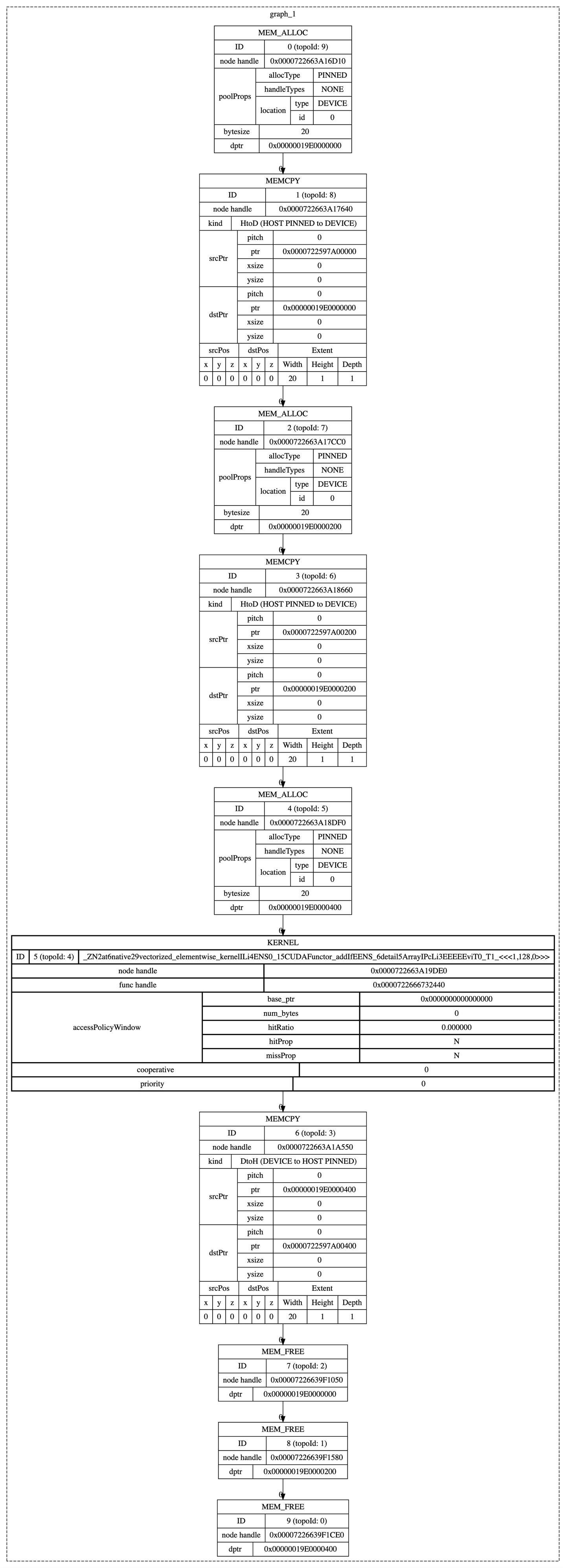
这里我们就可以看到多个memory allocation、memory free的节点了,就是对应于cudaMallocAsync与cudaFreeAsync。
使用cudagraph观察NCCL的实现原理
我们使用nsight system查看NCCL相关调用时,它只会显示一个黑盒函数ncclAllreduce,而不会显示细节。现在我们加上cudagraph,就可以看到期间的调用细节了:
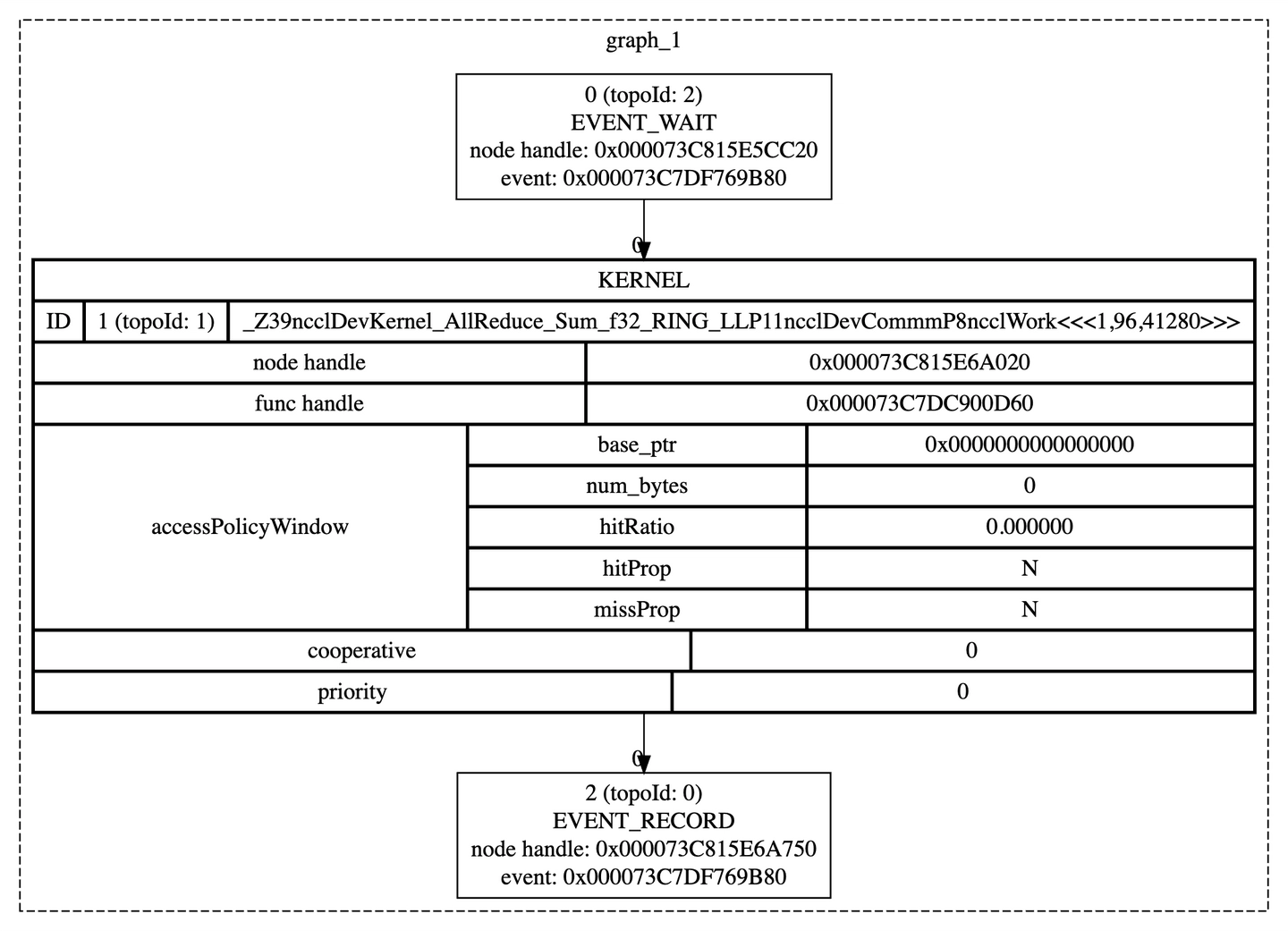
如此,我们可以得知,allreduce就是一个kernel。
同时捕获多个batchsize的cudagraph
假设我们要实现的函数是c = a ** 2 + b * 2,其中a与b的形状是[N, 1024]。如果我们能知道最大batchsize是多大,那么我们可以让多个cudagraph共享输入、输出。
代码为:
import torch
from contextlib import contextmanager

@contextmanager
def graph_capture(pool=None, stream=None, capture_error_mode: str = "global", dump_path=None):
    g = torch.cuda.CUDAGraph()
    if dump_path is not None:
        g.enable_debug_mode()
    with torch.cuda.graph(cuda_graph=g, pool=pool, stream=stream, capture_error_mode=capture_error_mode):
        yield g
    if dump_path is not None:
        g.debug_dump(dump_path)

import ctypes

# Load the CUDA runtime library
cudart = ctypes.CDLL('libcudart.so')

# Define cudaMemcpyKind enumeration as in the CUDA API
cudaMemcpyHostToHost = 0
cudaMemcpyHostToDevice = 1
cudaMemcpyDeviceToHost = 2
cudaMemcpyDeviceToDevice = 3
cudaMemcpyDefault = 4

# Setup the prototype of the cudaMemcpyAsync function
cudaMemcpyAsync = cudart.cudaMemcpyAsync
cudaMemcpyAsync.argtypes = [
    ctypes.c_void_p,          # void* dst
    ctypes.c_void_p,          # const void* src
    ctypes.c_size_t,          # size_t count
    ctypes.c_int,             # enum cudaMemcpyKind
    ctypes.c_void_p           # cudaStream_t stream
]
cudaMemcpyAsync.restype = ctypes.c_int

MAX_BATCHSIZE = 128

# Placeholder input used for capture
static_a = torch.zeros((MAX_BATCHSIZE, 1024), device="cpu").pin_memory()
static_b = torch.zeros((MAX_BATCHSIZE, 1024), device="cpu").pin_memory()
static_output = torch.zeros((MAX_BATCHSIZE, 1024), device="cpu").pin_memory()

def compute(batchsize):
    a = static_a[:batchsize].to("cuda", non_blocking=True)
    b = static_b[:batchsize].to("cuda", non_blocking=True)
    output = (a ** 2 + b * 2)
    result = cudaMemcpyAsync(static_output.data_ptr(), output.data_ptr(), output.numel() * output.element_size(), cudaMemcpyDeviceToHost, torch.cuda.current_stream().cuda_stream)
    assert result == 0
    return static_output[:batchsize]

# Warmup before capture
s = torch.cuda.Stream()
s.wait_stream(torch.cuda.current_stream())
with torch.cuda.stream(s):
    for i in range(1, MAX_BATCHSIZE + 1):
        compute(i)
torch.cuda.current_stream().wait_stream(s)

def report_memory(prefix):
    free, total = torch.cuda.mem_get_info()
    used = total - free
    print(f"{prefix}: Used: {used / 1024 / 1024} MB, Free: {free / 1024 / 1024} MB, Total: {total / 1024 / 1024} MB")

# Captures the graph
# To allow capture, automatically sets a side stream as the current stream in the context
report_memory("Before capture")
graphs = [0] # 0 is a placeholder for 0 batchsize
memory_pool = None
for i in range(1, MAX_BATCHSIZE + 1):
    with graph_capture(pool=memory_pool) as g:
        compute(i)
    graphs.append(g)
    memory_pool = g.pool()
report_memory("After capture")
# Run the graph
static_a[:2] += 1
static_b[:2] += 2
graphs[2].replay()
torch.cuda.current_stream().synchronize()
print(static_output[:2])
输出为:
Before capture: Used: 391.6875 MB, Free: 32102.4375 MB, Total: 32494.125 MB
After capture: Used: 407.6875 MB, Free: 32086.4375 MB, Total: 32494.125 MB
tensor([[5., 5., 5.,  ..., 5., 5., 5.],
        [5., 5., 5.,  ..., 5., 5., 5.]])
此时显存占用为16MB。
如果我们注释掉memory_pool = g.pool()这一行,就会变成:
Before capture: Used: 391.6875 MB, Free: 32102.4375 MB, Total: 32494.125 MB
After capture: Used: 711.6875 MB, Free: 31782.4375 MB, Total: 32494.125 MB
tensor([[5., 5., 5.,  ..., 5., 5., 5.],
        [5., 5., 5.,  ..., 5., 5., 5.]])
此时显存占用变成了320MB,增长了20倍。